Unreal Scene Generation
SpaRRTa leverages Unreal Engine 5 to generate photorealistic synthetic images with precise control over object placement, camera positions, and environmental conditions. This enables the creation of a rigorous benchmark with mathematically precise ground-truth labels.
Why Synthetic Data?
Evaluation Environments
SpaRRTa includes five diverse high-fidelity environments to ensure robust evaluation across different visual domains:
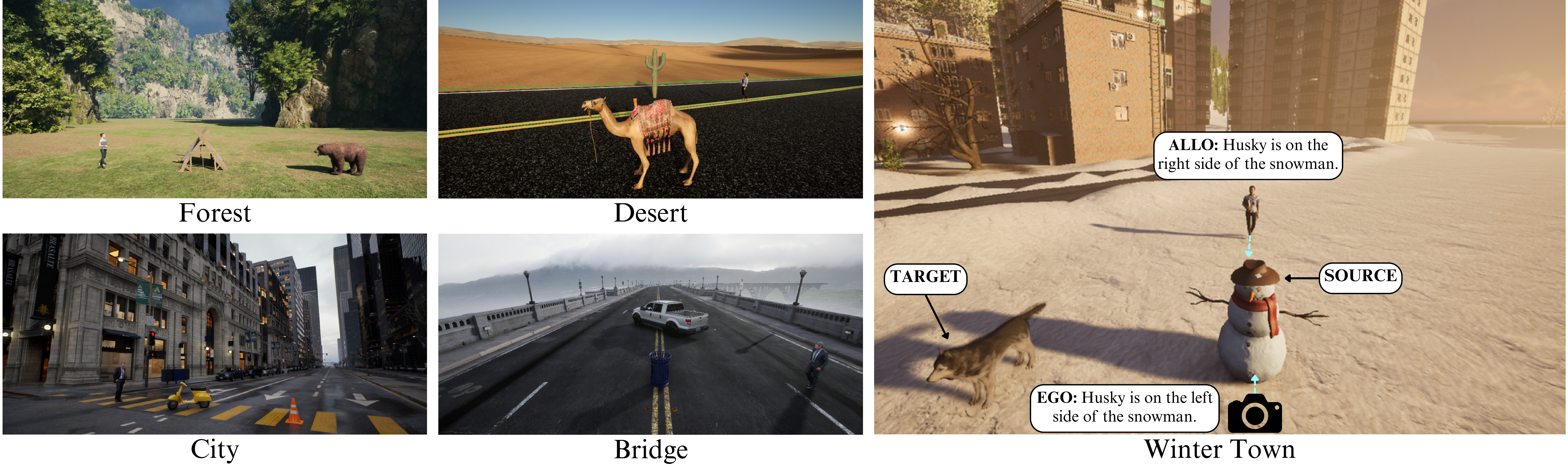
Environment Details
Electric Dreams Environment
A sparse forest landscape with complex foliage, uneven terrain, and natural rock formations. This environment tests spatial reasoning in organic, unstructured settings.
- Source: Electric Dreams (Epic Games)
- Characteristics: Complex foliage, uneven terrain, natural lighting
- Objects: Bear, Fox, Tent, Rocks, Trees
Arid Landscape
A vast, arid landscape characterized by open terrain, sand dunes, and high-contrast lighting. This environment is sparse and texture-homogeneous.
- Source: Realistic Desert Pack
- Characteristics: Open terrain, high contrast lighting, minimal occlusion
- Objects: Camel, Barrel, Cactus, Rocks
Eastern European Village
A snow-covered setting reflecting a typical small Eastern European town with cold lighting, snow textures, and village buildings.
- Source: Russian Winter Town
- Characteristics: Cold lighting, snow textures, village architecture
- Objects: Husky, Deer, Snowman
Valley Infrastructure
A valley scene centered around a large bridge infrastructure with mixed natural and man-made elements.
- Source: Automotive Bridge Scene
- Characteristics: Infrastructure elements, valley terrain, mixed complexity
- Objects: Bicycle, Trash Can, Vehicle
Modern Metropolis
A large-scale, modern American metropolis featuring high-rise architecture, paved roads, and complex urban geometry.
- Source: City Sample (Epic Games)
- Characteristics: Dense urban geometry, complex occlusion, varied lighting
- Objects: Motorcycle, Traffic Cone, Fire Hydrant
Asset Library

Asset Selection Criteria
Our asset selection follows specific criteria to ensure valid spatial reasoning evaluation:
- ImageNet Alignment: Objects align with common ImageNet super-categories to ensure VFMs can recognize them
- Isotropic Sources: Source objects (rocks, trees, cones) are rotationally symmetric to minimize orientation ambiguity
- Environmental Coherence: Objects naturally fit their respective environments (e.g., camels in desert)
- Visual Distinctiveness: Objects are clearly distinguishable from backgrounds and each other
| Category | Assets |
|---|---|
| Animals | Bear, Fox, Camel, Husky, Deer |
| Vehicles | Car, Taxi, Motorcycle, Bicycle |
| Nature | Trees, Rocks, Cactus |
| Objects | Tent, Barrel, Trash Can, Traffic Cone, Fire Hydrant, Snowman |
| Humans | Human agent (viewpoint for allocentric tasks) |
Data Generation Pipeline
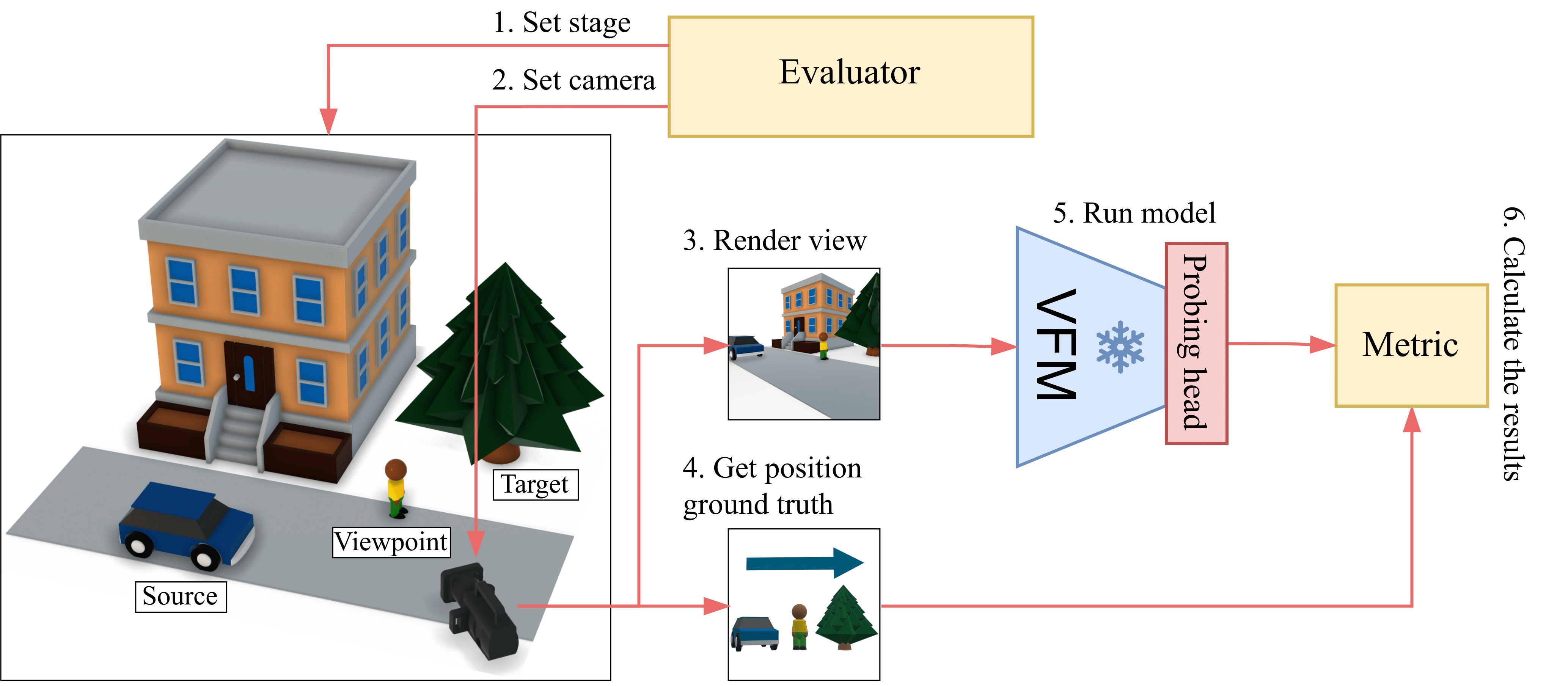
Pipeline Steps
flowchart LR
    A[Set Stage] --> B[Set Camera]
    B --> C[Render View]
    C --> D[Get Ground Truth]
    D --> E[Run Model]
    E --> F[Calculate Results]

    style A fill:#7c4dff,color:#fff
    style B fill:#7c4dff,color:#fff
    style C fill:#536dfe,color:#fff
    style D fill:#536dfe,color:#fff
    style E fill:#3f1dcb,color:#fff
    style F fill:#3f1dcb,color:#fff
1. Set Stage
The evaluator establishes the scene configuration:
- Select environment (Forest, Desert, Winter Town, Bridge, City)
- Choose source, target, and viewpoint objects from the asset library
- Randomly sample object positions from a Gaussian distribution
- Apply physics-aware terrain adaptation via raycasting
2. Set Camera
Configure the viewpoint for image capture:
- Sample camera position within a defined area surrounding scene center
- Orient camera toward placed objects
- Validate visibility constraints (objects within field of view)
- Ensure proper scene composition (no extreme clustering or distance)
3. Render View
Generate high-fidelity imagery using Unreal Engine 5:
- Ray-traced RGB image with dynamic global illumination
- Ground-truth segmentation masks for validation
- Resolution: 2048x2048 - Later, it is downsampled to 224×224 (standard VFM input size)
4. Get Ground Truth
Extract spatial relation labels:
- Calculate angular relationship between source and target objects
- Apply viewpoint transformation (camera for ego, human for allo)
- Filter ambiguous configurations (objects near decision boundaries)
- Assign discrete label: Front, Back, Left, or Right
Geometric Ambiguity Control
A key challenge in spatial classification is defining precise boundaries between classes. SpaRRTa implements strict rejection sampling to eliminate label noise:

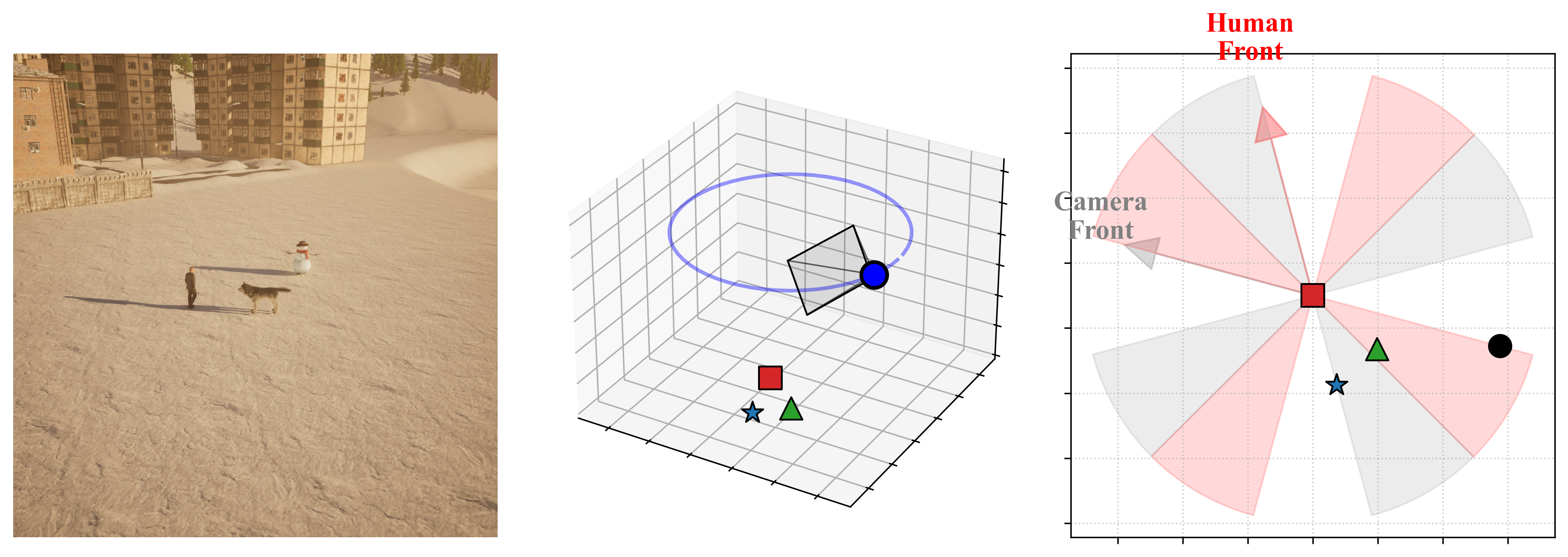
Exclusion Zones
Ambiguity zones are defined as conical regions centered along the diagonals:
- 45°, 135°, 225°, 315° relative to the viewpoint's forward vector
- Any sample where the target falls within these zones is automatically rejected
- This guarantees unambiguous ground-truth labels
Rejection Sampling
The pipeline automatically discards configurations where the target object lies within ±15° of a diagonal boundary, ensuring all retained samples have mathematically precise labels.
Technical Implementation
Rendering Stack
| Component | Details |
|---|---|
| Engine | Unreal Engine 5.5 |
| Lighting | Lumen (dynamic global illumination) |
| Geometry | Nanite (virtualized geometry) |
| API | Python Editor API + UnrealCV |
| Hardware | 2× NVIDIA RTX 2080 Ti (11GB VRAM) |
Camera Configuration
The camera system uses Unreal Engine's CineCameraActor with standardized settings:
def create_camera():
    """
    Initialize CineCameraActor with standardized parameters.
    """
    # Filmback settings (sensor dimensions)
    sensor_width = 50.0   # mm
    sensor_height = 50.0  # mm

    # Lens settings
    focal_length = 50.0   # mm
    aperture = 10.0      # f-stop

    # Calculate FOV from sensor and focal length
    horizontal_fov = 2 * arctan(0.5 * sensor_width / focal_length)
    vertical_fov = 2 * arctan(0.5 * sensor_height / focal_length)
    # Result: ~53° horizontal FOV
    fov = (horizontal_fov, vertical_fov)

    # Create camera with these settings
    camera = CineCameraActor(location, rotation)
    camera.set_filmback(sensor_width, sensor_height)
    camera.set_focal_length(focal_length)
    camera.set_aperture(aperture)

    return camera
Object Placement Algorithm
Objects are placed using an iterative rejection sampling approach with physics-aware terrain adaptation:
def place_objects(environment, objects, max_attempts=10):
    """
    Place objects with physics-aware terrain adaptation.
    Uses iterative rejection sampling to ensure valid configurations.
    """
    # Sample center point for object cluster
    center_x = sample_gaussian(environment_center_x, sample_radius)
    center_y = sample_gaussian(environment_center_y, sample_radius)
    center_z = environment_base_z

    for attempt in range(max_attempts):
        valid_placement = True

        for obj in objects:
            # Sample random rotation
            rotation = random_rotation(yaw_range=(0, 360))

            # Sample X, Y positions around center using Gaussian distribution
            obj_x = random_gaussian(center_x, object_proximity_std)
            obj_y = random_gaussian(center_y, object_proximity_std)

            # Perform line trace to find ground height at (X, Y)
            ground_z = detect_ground_at_position(obj_x, obj_y, center_z)

            # Calculate proper Z position accounting for object bounds
            # Get how much object extends below its origin
            object_ground_offset = obj.get_ground_offset()

            # Place object so bottom surface touches ground
            spawn_z = ground_z - object_ground_offset + safety_margin

            position = Vector(obj_x, obj_y, spawn_z)
            obj.move_to(position, rotation)

        # Validate configuration
        for i in range(len(objects)):
            for j in range(i + 1, len(objects)):
                # Check for AABB overlap (collision detection)
                if objects[i].overlaps(objects[j]):
                    valid_placement = False
                    break

                # Check objects are not too far apart
                if objects[i].distance_to(objects[j]) > max_distance:
                    valid_placement = False
                    break

            if not valid_placement:
                break

        if valid_placement:
            return True, (center_x, center_y)

    # All attempts failed
    return False, (center_x, center_y)
Camera Sampling with Screenshot
Camera positioning uses iterative sampling to ensure all objects are properly framed:
def sample_camera(camera, objects, object_center, max_attempts=15):
    """
    Sample camera position and orientation with validation.
    Ensures all objects are visible and properly framed.
    """
    center_x, center_y = object_center

    # Calculate average Z position of all objects
    avg_object_z = mean([obj.get_location().z for obj in objects])

    for attempt in range(max_attempts):
        # Sample camera position around object cluster
        camera_x = random_uniform(center_x - camera_range, center_x + camera_range)
        camera_y = random_uniform(center_y - camera_range, center_y + camera_range)
        camera_z = random_uniform(avg_object_z, avg_object_z + camera_height_range)

        camera_position = Vector(camera_x, camera_y, camera_z)
        camera.move_to(camera_position)

        # Orient camera to look at centroid of all objects
        object_centroid = calculate_centroid([obj.get_location() for obj in objects])
        camera.look_at_many(objects)

        # Validate all objects are within camera FOV
        object_angles = []
        for obj in objects:
            # Calculate angle between camera forward vector and object
            angle = camera.angle_to(obj)
            object_angles.append(angle)

        max_angle = max(object_angles)
        min_angle = min(object_angles)

        # Check objects are within FOV bounds
        # Reject if any object is too far from center (outside FOV)
        if max_angle > (camera.fov - margin):
            continue  # Reject and resample

        # Reject if all objects are too close to center (too clustered)
        if max_angle < min_angle_threshold:
            continue  # Reject and resample

        # Valid camera configuration found
        return True

    # All attempts failed
    return False
Iterative Rejection Sampling
The pipeline uses iterative rejection sampling with configurable maximum attempts:
- Object placement: Up to X attempts to find valid non-overlapping configurations
- Camera sampling: Up to Y attempts to find valid camera positions with all objects in frame
- Failed attempts are automatically discarded and resampled
Parameter Serialization
For each successfully generated scene, the pipeline serializes:
- Camera intrinsics (sensor dimensions, focal length, FOV, aperture)
- Camera extrinsics (position, rotation)
- Object positions and rotations
- All metadata saved to JSON files for reproducibility
Dataset Statistics
| Environment | Ego Images | Allo Images |
|---|---|---|
| Forest | 5,000 | 10,000 |
| Desert | 5,000 | 10,000 |
| Winter Town | 5,000 | 10,000 |
| Bridge | 5,000 | 10,000 |
| City | 5,000 | 10,000 |
| Total | 25,000 | 50,000 |
Dataset Size Rationale
- Egocentric: 5,000 images sufficient for generalization
- Allocentric: 10,000 images needed due to increased task complexity (perspective transformation learning)
Scene Visualizations
Explore interactive visualizations of generated scenes showing photorealistic renderings alongside their 3D spatial annotations and 2D top-down views.
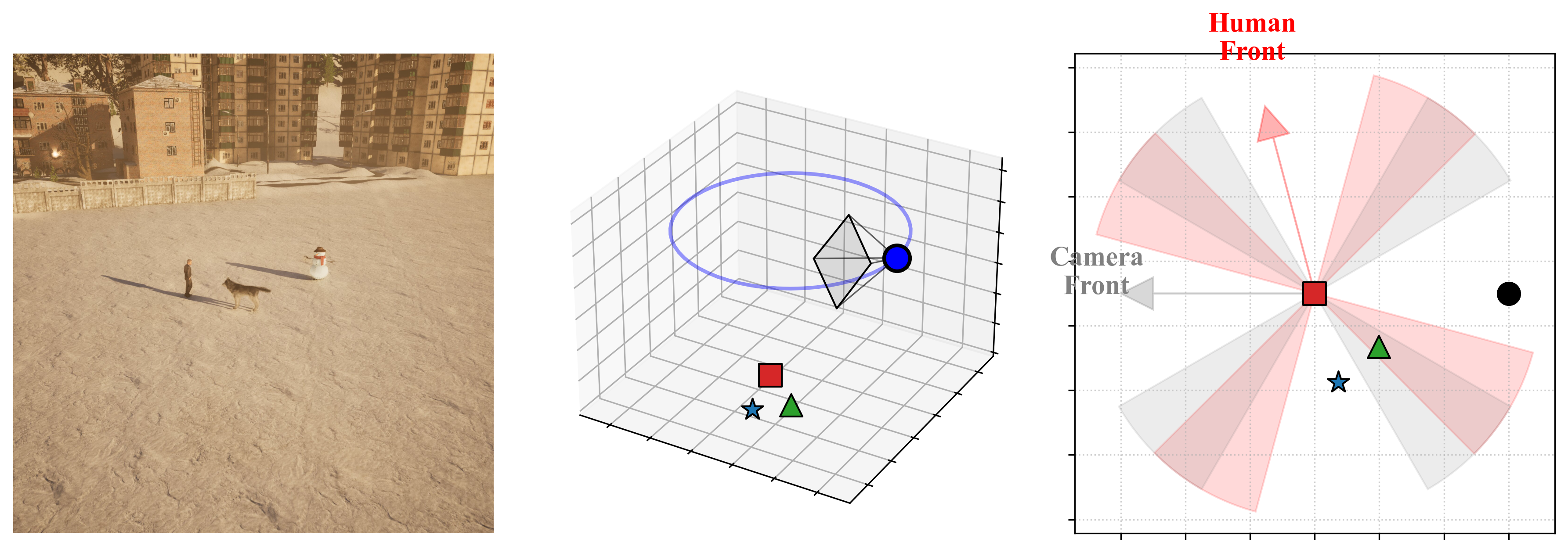
Environment-Asset Relations
Each environment contains 3 unique object triples used for evaluation. The table below shows the complete mapping of environments to their source objects, target objects, and viewpoint configurations:
| Triple ID | Source Object | Target Object | Viewpoint |
|---|---|---|---|
| Bridge-1 | Truck | Tree | Camera / Human 1 |
| Bridge-2 | Bike | Trash Bin | Camera / Human 2 |
| Bridge-3 | Vespa | Trash Bin | Camera / Human 3 |
| City-1 | Vespa | Cone | Camera / Human 1 |
| City-2 | Taxi | Fire Hydrant | Camera / Human 2 |
| City-3 | Bike | Cone | Camera / Human 3 |
| Desert-1 | Truck | Rock | Camera / Human 1 |
| Desert-2 | Camel | Cactus | Camera / Human 2 |
| Desert-3 | Camel | Barrel | Camera / Human 3 |
| Forest-1 | Tree | Rock | Camera / Human 1 |
| Forest-2 | Bear | Tent | Camera / Human 2 |
| Forest-3 | Fox | Rock | Camera / Human 3 |
| Winter-1 | Truck | Tree | Camera / Human 1 |
| Winter-2 | Husky | Snowman | Camera / Human 2 |
| Winter-3 | Deer | Tree | Camera / Human 3 |
Viewpoint Configuration
- Camera: Used for egocentric (SpaRRTa-ego) task evaluation
- Human 1 / 2 / 3: Different human models used for allocentric (SpaRRTa-allo) task evaluation, each with unique poses and positions